UniWeek

An application that visualizes university schedules from .xlsx files into clean, interactive layouts with live status updates.

Check it out

Jan 21, 2026 — Jan 28, 2026

Source CodeProject PageLive Demo

Tech Stack

Development Blog Posts

Foundation

January 21, 2026 - 8:23PM

I won't make the mistake of starting a project before creating the blog this time..

But after a fun time building RamAI, especially visualizing the data, I realized I wanted to work with data more.

I was trying to think of times at college where I just wished a tool existed. One of those times was when I was trying to create a visual schedule for the semester by looking back and forth at the blue text in Workday. I didn't even realize that Workday had a calendar view until halfway through my college career. Even so, their calendar view was not really user-friendly. Conveniently enough, the Workday developers created a button not far from it to export the .xlsx file of your schedule. I opened the file but it looked the exact same as on the website. Maybe Workday added this feature so us developers could do something with it? If so, I'm interested..

Yes, it's called UniWeek for now. I'm not sure if I'll keep that name, but my eye itches when my projects don't have names. I'm probably going to choose Next.js and React to build this project just for UI flexibility and premium component usage. The MVP steps for this project is pretty simple:

  • Let user upload the .xlsx schedule file exported from Workday.
  • Parse the .xlsx file and extract the data.
  • Create a visual representation of the schedule using the data.
  • Use the time I would have spent making my own clean schedule to do something more productive.

That's all I had in mind for today, I have some quizzes to study for and lecture recordings to re-watch, so I'll leave it at that for now.
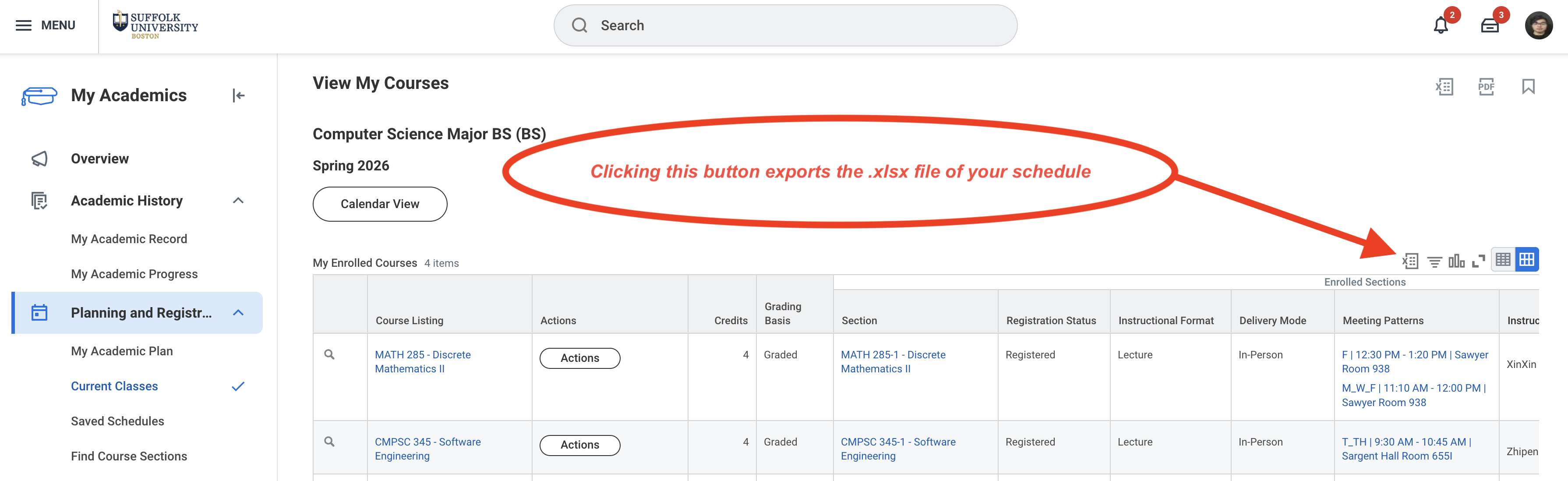
Image 1

— Montasir

Ideation

January 24, 2026 - 1:37PM

If you haven't read my previous post, I started developing a schedule visualization app a few days ago. I wanted to build something that takes an .xlsx file and turns it into a clean layout that shows the class blocks and actually reflects how students could move through their day. After outlining and confirming the general architecture and tech stack for the project, I started working on a small prototype.

  • Parses the user's uploaded .xlsx file and extracts the data.
  • Creates a nice visual representation of the schedule using the data, laid out on a grid with time and days of the week.
  • Each class block opens up the side panel when clicked, showing more details about the class.
  • Gaps between class blocks opens up the side panel when clicked, showing where the nearest dining halls, cafes, and common areas are.
  • Gaps before the first and after the last class blocks open up the side panel when clicked, showing the nearest MBTA stations and parking garages. These two ideas are adopted so the app is less mundane.
  • TailwindCSS use variables in #globals.css of course, so I can support both light and dark mode in the future. This also makes it easier to change the color scheme later on.

One important thing to note is that the project has been planned and built with scalability in mind. I've designed the architecture so that adding support for more universities in the future would be straightforward. Right now, the project is able to support Suffolk University, each university would have its own parser module that knows exactly how to extract data from that specific university's schedule format. The only thing that would need to be done for each university is constructing the general dataset needed to render this project's unique approach of showing what the student can do between class block gaps and etc. The rest of the system would remain unchanged, making it easy to expand the project's reach over time if I ever decided to.

That's all I wanted to share today, I'll continue working on the project when I have free time.

— Montasir

Live

January 25, 2026 - 11:14PM

In the middle of a snow storm here in Boston, but I'm cozy enough to continue working on this..

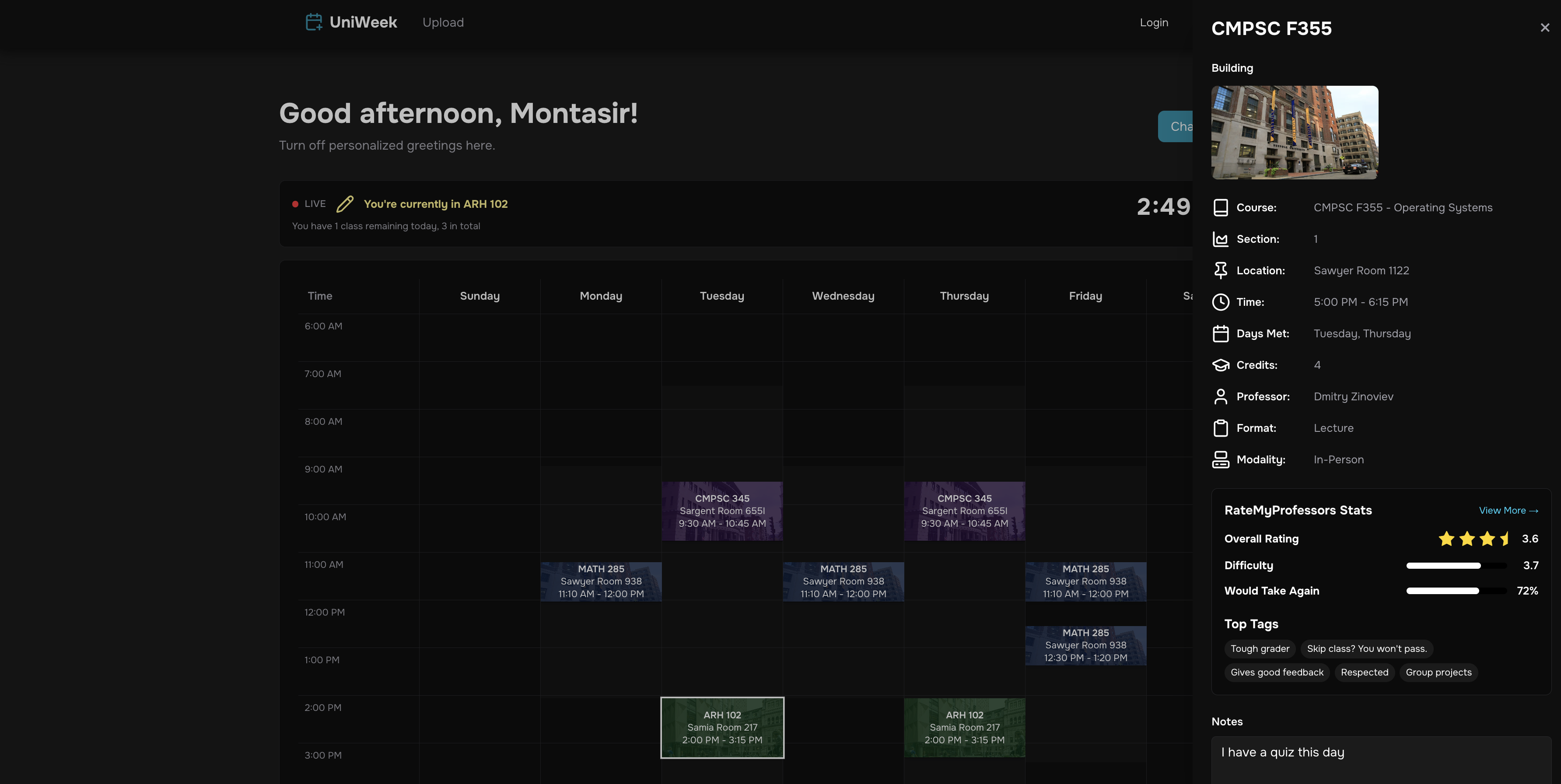
I've been coming up with ideas while working on some features for the app, and one of them is to add a live component to the schedule. What I mean by that is that the app will have a status, telling you whether you're currently in class or not, on a break, or if your next class is starting soon. Of course, it's better to be aware yourself of your schedule, but I think having this feature would be a nice touch. Below, I'll outline how I did it.

First, I built a LiveStatus component that updates every single second using setInterval. The component calculates the current time in minutes since midnight and compares it against all classes scheduled for today. It filters the schedule to only show classes for the current day, then sorts them chronologically to find what's happening right now.

The logic was a bit intricate. The component needs to detect six different states:

  • You're currently in class
  • Your next class starts in 5 minutes
  • You're on a break between classes
  • All your classes are done for the day
  • You have no classes today

Each state displays a different message. But what makes it feel alive is the dynamic color system. The status text changes color based on urgency, for example, yellow when you're in class, orange when your next class is within 5 minutes, and green when your day is done. The component also displays a pulsing red dot labeled "Live" to emphasize that it's actively tracking your schedule in real time.

I also had to make sure the component handles re-renders properly. The setInterval updates the currentTime state every second which:

  • Handles all the calculations
  • Finds today's classes
  • Detects the current class
  • Calculates minutes until the next one
  • Determines remaining classes

The secondary info line is context aware too. It shows "Today you have X classes, Y left" during the day, but switches to showing a countdown like "Next class in 45 minutes" when you're between classes. If the next class is over an hour away, it formats it as "Next class in 2h 15m" for readability. Small details like pluralization ("1 class" vs "2 classes") and 12 hour time formatting keep the UI polished. I try to do these small UI touches before I actually try hard to make the UI look good, which will come later.

The hardest part was making sure everything recalculates on every render without causing performance issues. I initially had bugs where the status wouldn't update until I re-uploaded the schedule. The fix was making sure all derived values like statusColor, statusData, and secondaryInfo are computed inline during render rather than cached in useEffect or useMemo. This way, when currentTime updates every second, React automatically recalculates everything.

Overall, this makes the website feel at least a little more responsive and alive, exactly what I was trying to do.

Congratulations if you made it this far. I know this was one of my longer posts.. but I really wanted to share the process thoroughly.

That's all for now though, stay warm and safe if you're in the snow storm like me!

Image 1Image 2

— Montasir

Live II

January 27, 2026 - 3:58PM

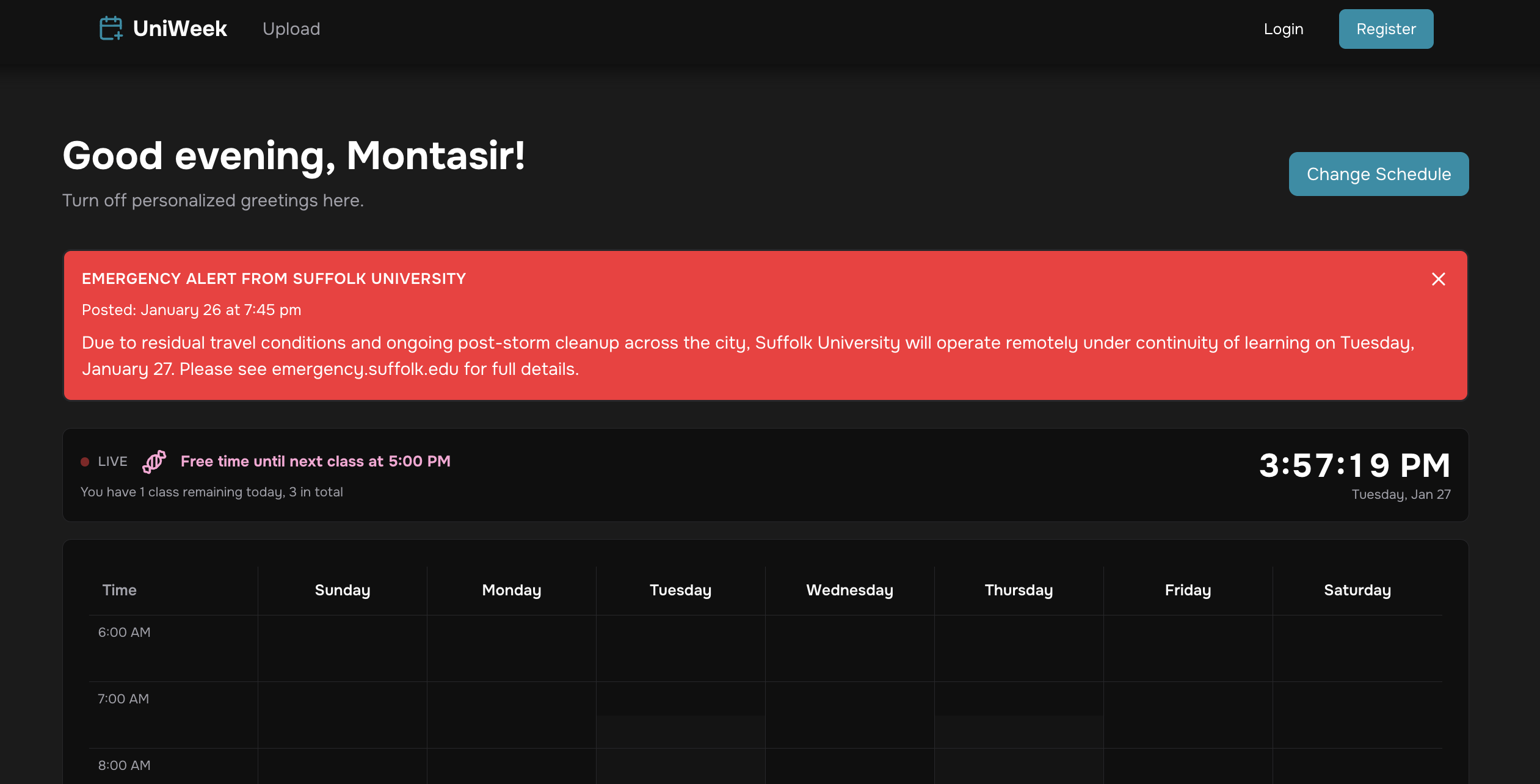
Continuing from my last post about adding live features to UniWeek... I've implemented real-time emergency alerts from Suffolk University's website.

A Python script scrapes the university homepage for the #globalAlert element, parsing the date and message using HTMLParser. A Next.js API route spawns the script and returns JSON to the frontend, which displays alerts above the schedule when active.

It was a simple and quick implementation, but adds real value for students who many rely on UniWeek for their schedules.

Image 1

— Montasir

Conclusion

January 28, 2026 - 10:13PM

I had a lot of fun building UniWeek over the past week, but I think I'll be pausing active development for now. It's reached a solid MVP state where users can upload their schedule and get a clean visual representation with live status updates and emergency alerts.

It does seem like I'm burning through projects quickly lately, but I think that's okay as long as I'm learning and enjoying the process. I've learned a lot about parsing .xlsx files and using Python for real time data scraping, which are skills I can apply to future projects.

Honestly, I'm not even kidding when I say I'll actually use this app for the first few days whenever a new semester starts. Even if it's just a few days of using it every semester, it's really helpful to know what my day would look like at a glance.

View the site at:

https://uni-week.vercel.app/

View the source code on GitHub:

https://github.com/montasirmoyen/uniweek

— Montasir

Montasir Moyen - Full-Stack Software Developer & Engineer in Boston